BA Playbook
The Batch Ran Successfully. So Why Is the Data Missing?
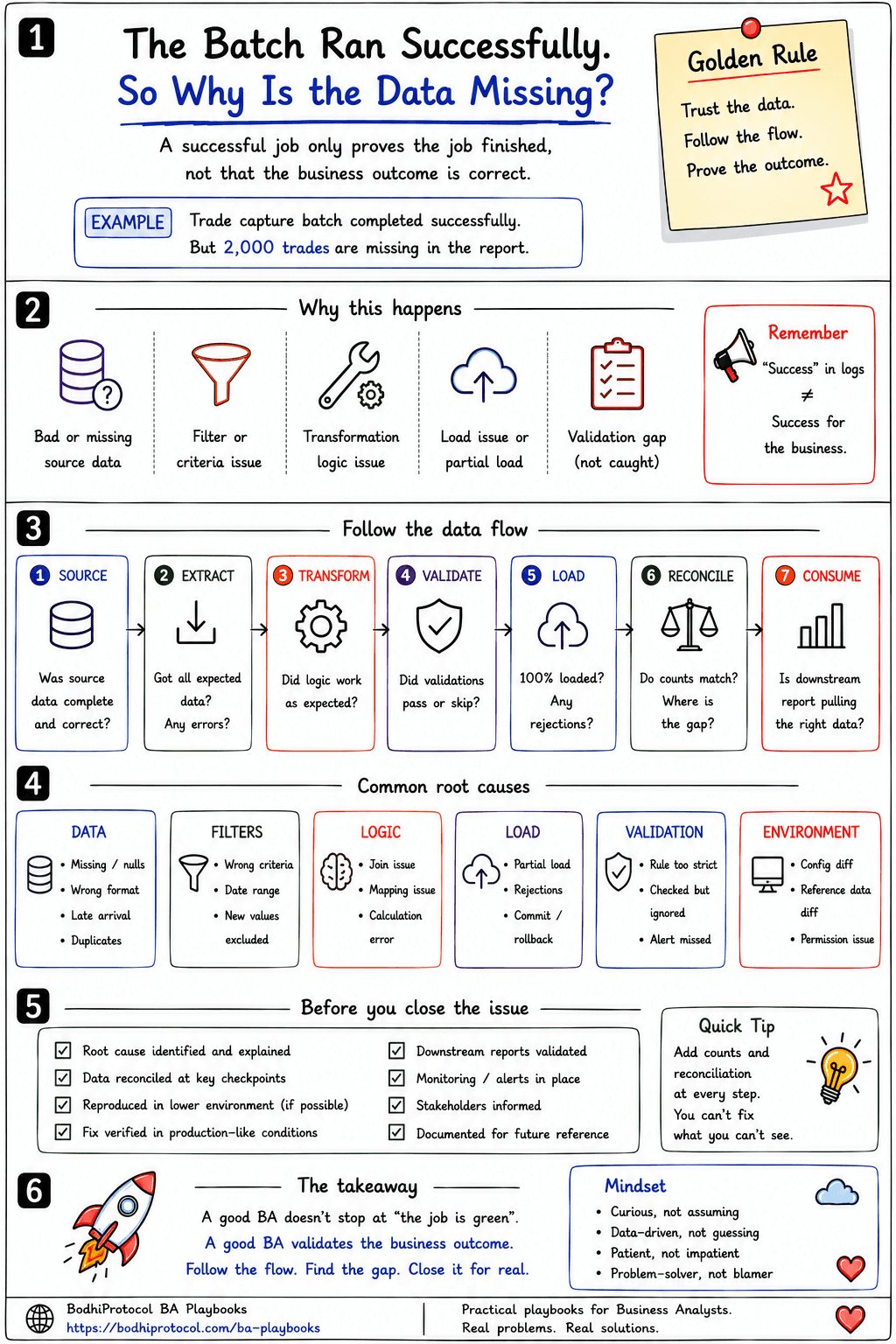
A green status proves the job finished. It doesn't prove the business outcome was correct.
Surya · August 13, 2026 · 5 min read · 9 practices
For Business Analysts and Ops teams investigating a batch that reports SUCCESS but is missing data, BAs supporting reconciliation, data quality or control functions, QAs and developers trying to isolate which pipeline stage actually dropped records and Anyone who's had to explain "the job is green" to someone holding the wrong number.
It's 8:30 AM. Operations opens the daily report. Yesterday: 48,216 records. Today: 46,193 records. More than 2,000 records are missing. Someone checks the overnight batch. Status: SUCCESS. The developer says the job completed successfully. Operations asks where the data is. Both can be right — a successful job proves the process finished. It does not prove the business outcome was correct. Picture a bank processing yesterday's trades overnight: Trade Source → Extract → Transform → Validate → Load → Reconcile → Report. The batch normally handles about 50,000 trades. Today the scheduler is green — no obvious technical failure — but the report is missing 2,000 trades. Don't start by staring at the final report. Follow the data. The fix isn't arguing about whether the batch "worked." It's tracing the record count through every stage until you find the exact checkpoint where expected stops matching actual. That's what turns "some data is missing" into "2,000 expected records disappeared between Transform and Validate" — a problem someone can actually go fix.
01Checkpoint 01
SOURCE — Did the data exist?
Before blaming the batch, check whether the source ever had the missing records to begin with.
Checkpoint 01
SOURCE — Did the data exist?
Before blaming the batch, check whether the source ever had the missing records to begin with.
If the source contained only 48,000 records, the problem may be upstream, before your pipeline ever touched the data. If the source had 50,000 but only 48,000 were extracted, you've already narrowed the problem to something inside your own process.
At a glance
- How many records were expected?
- How many were actually available?
- Did every source system deliver?
- Did anything arrive late?
- Were records incomplete, duplicated or malformed?
- Was the extraction window correct?
Why it helps
Counts turn "some data is missing" into "2,000 expected records disappeared between Source and Extract" — a much easier thing to investigate.
02Checkpoint 02
EXTRACT — Did we select everything we should?
A batch can run successfully while selecting the wrong population entirely.
Checkpoint 02
EXTRACT — Did we select everything we should?
A batch can run successfully while selecting the wrong population entirely.
The key question is: what selection criteria were actually used? Then compare Expected → Selected → Rejected.
At a glance
- The query says trade_date = yesterday, but some trades arrived after midnight.
- A filter excludes a newly introduced status.
- Extraction uses created_date while the business expects trade_date.
Why it helps
A green extract can still be incomplete — the job succeeded at running the wrong query.
03Checkpoint 03
TRANSFORM — Did business logic remove records?
This is where data gets mapped, enriched, joined, aggregated, converted, deduplicated and classified — and where records quietly leave the population.
Checkpoint 03
TRANSFORM — Did business logic remove records?
This is where data gets mapped, enriched, joined, aggregated, converted, deduplicated and classified — and where records quietly leave the population.
The 1,800-record gap
At a glance
- A join requires reference data that doesn't exist for a new product.
- An unmapped currency drops records.
- Deduplication removes valid trades, not just duplicate ones.
Why it helps
Don't just ask whether transformation succeeded. Ask what rule caused these specific records to leave the expected population.
04Checkpoint 04
VALIDATE — Did something fail quietly?
Most pipelines validate before loading — but what happens when a record fails validation matters as much as the validation itself.
Checkpoint 04
VALIDATE — Did something fail quietly?
Most pipelines validate before loading — but what happens when a record fails validation matters as much as the validation itself.
Does the entire batch stop on a failure, or does it reject the record and continue? A job can show SUCCESS while thousands of records sit in a rejection table, an error queue, an exception file or a dead-letter queue.
At a glance
- Account exists?
- Mandatory fields populated?
- Currency valid?
- Status allowed?
- Reference data available?
Why it helps
Don't ask only whether validation ran. Ask how many records passed, failed and were skipped.
05Checkpoint 05
LOAD — Did everything actually land?
Records passing validation is not the same as records reaching the target.
Checkpoint 05
LOAD — Did everything actually land?
Records passing validation is not the same as records reaching the target.
The flow
At a glance
- Constraint failures
- Duplicate-key errors
- Permission issues
- Storage problems
- Transaction rollbacks
- Partial commits
Why it helps
"Load completed" is not enough on its own — you need the numbers at every one of these five states.
06Checkpoint 06
RECONCILE — Find the first gap
This is usually the fastest way to locate the issue, and it's often skipped in favour of guessing.
Checkpoint 06
RECONCILE — Find the first gap
This is usually the fastest way to locate the issue, and it's often skipped in favour of guessing.
Take the bank's overnight batch: Source 50,000, Extracted 50,000, Transformed 48,200, Validated 48,200, Loaded 48,200, Reported 48,200. The first gap appears during transformation — a new instrument type was introduced yesterday, the transformation joins every trade to a reference-data table, and that new instrument type has no reference mapping. The join drops those records. The batch still completes. Technically SUCCESS. Business outcome: 2,000 trades missing.
Why it helps
Without reconciliation, a team can spend hours checking the scheduler, the database and the report. With it, the rule is simple: find the first checkpoint where expected ≠ actual. That's usually where the investigation should begin.
Pro tip — You can now explain the incident precisely: new instrument → missing reference mapping → join drops records → downstream population incomplete. That's far more useful than "batch issue."
07Checkpoint 07
CONSUME — Is the data missing, or just invisible?
Sometimes the data reached the target just fine. The user simply can't see it.
Checkpoint 07
CONSUME — Is the data missing, or just invisible?
Sometimes the data reached the target just fine. The user simply can't see it.
At a glance
- Report filters are wrong
- The dashboard cache is stale
- Reporting dates differ from processing dates
- Permissions hide records
- The downstream extract hasn't refreshed
- The report reads a different table or view
Why it helps
"Data missing from the pipeline" and "data missing from what the user sees" are different problems that need different fixes.
08Checkpoint 08
What does SUCCESS actually mean?
This is the question that often changes the entire investigation.
Checkpoint 08
What does SUCCESS actually mean?
This is the question that often changes the entire investigation.
Compare
Technical SUCCESS
Process started → no fatal exception → process ended.
Business SUCCESS
All expected records processed → exceptions identified → totals reconciled → downstream data available.
Why it helps
The developer and Operations aren't disagreeing about facts — they're using different definitions of the same word. One of the BA's jobs is turning technical success into measurable business success. If SUCCESS can mean the first definition while an important outcome is wrong, the success criteria itself is incomplete.
09Checkpoint 09
Turn the incident into a better requirement
Fixing the issue is only half the job. Ask how this gets detected automatically tomorrow.
Checkpoint 09
Turn the incident into a better requirement
Fixing the issue is only half the job. Ask how this gets detected automatically tomorrow.
For example: "Alert Operations if loaded record count differs from extracted count by more than 0.5%."
At a glance
- Source-vs-target reconciliation
- Rejected-record counts
- Control totals
- Tolerance thresholds
- Missing-data alerts
- Exception monitoring
Why it helps
You didn't just help fix yesterday's problem. You reduced the chance of tomorrow's problem going unnoticed.
A green status proves the process finished.
It doesn't prove the business outcome was correct.
Next time a batch reports SUCCESS but the numbers don't add up, don't stop at the scheduler. Trace the count through Source, Extract, Transform, Validate, Load, Reconcile and Consume, and find the first checkpoint where expected stops matching actual. That's where the investigation actually starts — and reconciling counts at every checkpoint is how you make sure it doesn't happen quietly again.
Take this with you
Missing Data / Batch Investigation Checklist
MISSING DATA / BATCH INVESTIGATION CHECKLIST

Batch / job name:
Expected record count:
Actual record count:
Gap:

CHECKPOINT COUNTS
Source:
Extract:
Transform:
Validate:
Load:
Report:

First checkpoint where expected ≠ actual:
Root cause type (source / selection / transformation / validation / load / consumption):

[ ] Root cause identified and explained
[ ] Counts reconcile at every checkpoint
[ ] Rejected or skipped records are understood
[ ] Missing records are restored or accounted for
[ ] Downstream output is verified
[ ] Monitoring or reconciliation controls added where needed
[ ] Stakeholders understand what happened
[ ] The learning is documented
Get new playbooks first.
Continue your BA journey
Two Systems Show Different NumbersA practical BA guide to investigating data mismatches.