BA Playbook
Front Office, Middle Office & Back Office — What Do They Actually Do?
Let's follow one trade from click to settlement.
Surya · August 12, 2026 · 7 min read · 6 practices
For Freshers and analysts starting their first Capital Markets project, Business Analysts who've heard "that's a Middle Office issue" without a clear definition, QAs and developers trying to understand why a small change touches several systems and Anyone trying to understand how Capital Markets actually work.
You join your first Capital Markets project.
Within a few meetings:
“That’s a Front Office issue.”
Then:
“Middle Office should catch it.”
Later:
“Check with Back Office.”
Everyone moves on.
You’re still thinking:
What exactly are these offices?
And where do Market Data, Reference Data and Risk fit?
Let’s use:
🇮🇳 Reliance Industries in India
and occasionally:
🌍 Microsoft in the US
to see how the same trade journey works across markets.
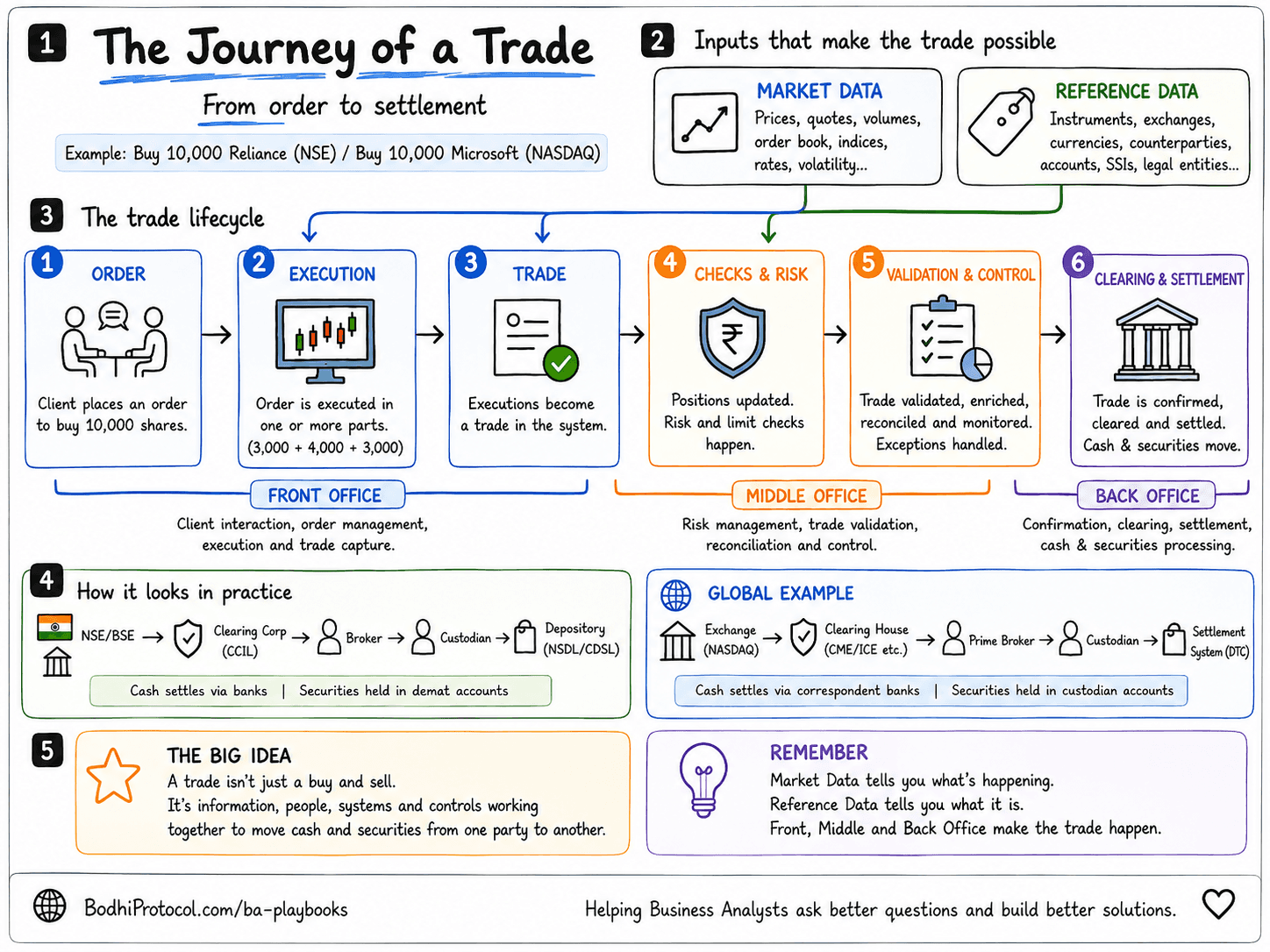
First, forget the word “office”
They’re not necessarily physical offices.
Think of them as broad responsibilities across the trade lifecycle.
A simple mental model:
Front Office → execute the trade
Middle Office → check and control it
Back Office → process it through settlement
And Risk?
That can cut across the whole journey.
One thing before we start:
Don’t memorize the org chart. Memorize the responsibility.
Different firms organise these teams differently.
The lifecycle is what matters.
Now let’s trade.
1. Market Data: What’s happening?
You’re about to buy Reliance on NSE.
First question:
“What’s the market doing?”
You need things like:
- price
- bid and ask
- volume
- order-book data
- indices
- rates
That’s Market Data.
A trader buying Microsoft needs the same kind of information from the relevant US market.
Easy way to remember it:
Market Data = What’s happening in the market right now?
Without it, you’re basically trading with the lights off.
2. Reference Data: What exactly are we trading?
You say:
“Buy Reliance.”
A human understands.
A system needs more.
Which instrument?
Which exchange?
Which currency?
Which account?
Which counterparty?
That’s Reference Data.
It describes things like:
- instruments
- exchanges
- currencies
- accounts
- legal entities
- settlement instructions
The distinction is simple:
Market Data → What’s happening to it?
Reference Data → What is it?
That one distinction will save you a lot of confusion later.
3. Front Office: Let’s get the order done
An institutional client says:
Buy 10,000 Reliance shares.
The order reaches the Front Office.
This is where you’ll hear terms like:
- Sales
- Trading
- Execution
- OMS
- EMS
The client sends an order.
But 10,000 shares may not execute at once.
Maybe:
3,000 execute.
Then 4,000.
Then 3,000.
Those are executions.
The same idea applies if the client is buying Microsoft in the US.
Front Office is basically asking:
“Okay, how do we actually get this order done?”
4. The trade executed. Done?
Nope.
This is one of the most important things to understand:
Executed doesn’t mean finished.
The Reliance order may show:
FILLED
Great.
But the trade can still have:
- the wrong account
- missing settlement instructions
- a position mismatch
- a reconciliation break
- a settlement failure
Imagine the execution is perfect.
But the settlement instruction points to the wrong account.
Front Office sees:
“Trade done.”
Post-trade teams see:
“We have a problem.”
So remember:
Execution success ≠ lifecycle complete
5. Middle Office: Did we capture it correctly?
The trader says:
“Done.”
Middle Office says:
“Cool. Is everything actually right?”
Responsibilities vary by firm, but Middle Office often deals with things like:
- trade validation
- positions
- P&L checks
- reconciliation
- trade enrichment
- exceptions
- controls
The simplest mental model:
Front Office
We traded it.
Middle Office
Did we capture and control it correctly?
That’s enough to get started.
6. Risk: What did this trade change?
Every trade changes something.
A position.
An exposure.
A risk.
You may hear:
Market Risk
What if the price moves against us?
Credit / Counterparty Risk
What if the other party cannot meet its obligation?
Liquidity Risk
Can we fund or exit the position?
Operational Risk
What if a system or process fails?
Here’s the important bit:
Risk doesn’t sit neatly at one point in the lifecycle.
A pre-trade limit check?
Risk.
Monitoring exposure after execution?
Risk.
Checking whether a counterparty is near its credit limit?
Also Risk.
So don’t think:
Front Office → Risk → Middle Office
Think:
Risk can cut across the whole journey.
7. Back Office: Now make the trade complete
You bought the Reliance shares.
Eventually, two things need to happen:
securities move
and
money moves.
That’s where Back Office comes in.
Depending on the firm, it may cover:
- confirmation
- clearing
- settlement
- cash processing
- securities processing
- reconciliation
- corporate actions
- settlement exceptions
In India, the journey may involve exchanges, clearing corporations, brokers, custodians and depositories such as NSDL or CDSL.
In the US, the infrastructure is different.
But the question is the same:
Did the buyer receive the securities, and did the seller receive the money?
That’s settlement at its simplest.
Now look at the whole journey
What looked like:
BUY RELIANCE
is actually closer to this:
Market Data
What’s happening?
Reference Data
What are we trading?
Front Office
Order → Execution → Trade
Middle Office
Validate → Enrich → Control
Back Office
Confirm → Clear → Settle
Cash + Securities move
And across the whole journey:
Risk
What exposure exists, and are we within our limits?
Now these stop looking like six unrelated definitions.
They’re all helping one trade move through a system.
Why this matters if you’re a BA, QA or developer
Imagine Development says:
“It’s just one new field.”
Sounds harmless. 😄
Now start asking:
Where does the field come from?
Does Front Office create it?
Does Reference Data supply it?
Does Risk use it?
Does Middle Office validate it?
Does Back Office need it?
Does another downstream system consume it?
Suddenly:
One field isn’t one field.
It’s information travelling through a chain.
For a BA, that’s impact analysis.
For a QA, it means testing beyond one screen.
For a developer, it explains why a tiny change can affect several systems.
And for a fresher or analyst, it gives you the map before you start learning every street.
The six questions to remember
When you see a new Capital Markets process, ask:
Market Data — What’s happening?
Reference Data — What exactly are we dealing with?
Front Office — How was it executed?
Risk — What exposure did it create?
Middle Office — Was it captured and controlled correctly?
Back Office — Did the transaction complete?
You don’t need to understand every system on day one.
Start with:
Where does this sit in the trade journey?
The idea to take away
When someone says:
“That’s a Front Office issue.”
or:
“Middle Office should investigate.”
Don’t immediately ask:
“Which department is that?”
Ask:
“What is happening to the trade at this point?”
That question will usually get you much closer to the answer.
Because a trade isn’t just a buy and a sell.
It’s a journey from intent → execution → control → settlement.
And Market Data, Reference Data and Risk help that journey work.
Once you see the journey, the jargon starts becoming a map.
Free download
40 Questions Every Capital Markets BA Should Ask
A practical question bank for understanding Front Office, Middle Office, Back Office, Risk, Market Data and Reference Data — useful during discovery sessions, walkthroughs, impact analysis, requirement discussions and system onboarding.
A trade isn't just a buy and a sell.
It's a journey from intent to execution to control to settlement.
Next time someone says "that's a Front Office issue" or "Middle Office should investigate," don't ask which department that is. Ask what is happening to the trade at this point — that question gets you a lot closer to the answer.
Take this with you
Trade Lifecycle Quick Reference
TRADE LIFECYCLE QUICK REFERENCE

Market Data — What's happening?

Reference Data — What exactly are we dealing with?

Front Office — How was it executed?

Risk — What exposure did it create?

Middle Office — Was it captured and controlled correctly?

Back Office — Did the transaction complete?
Get new playbooks first.
Continue your BA journey
Front-to-Back Trade Trace GuideFollow one ID, front to back, until the story stops matching.