BA Playbook
Jira Hacks for Business Analysts
12 small habits that make Jira much easier to live with.
Surya · August 8, 2026 · 4 min read · 12 practices
For Business Analysts, Product Owners, QA professionals and Developers working closely with BAs.
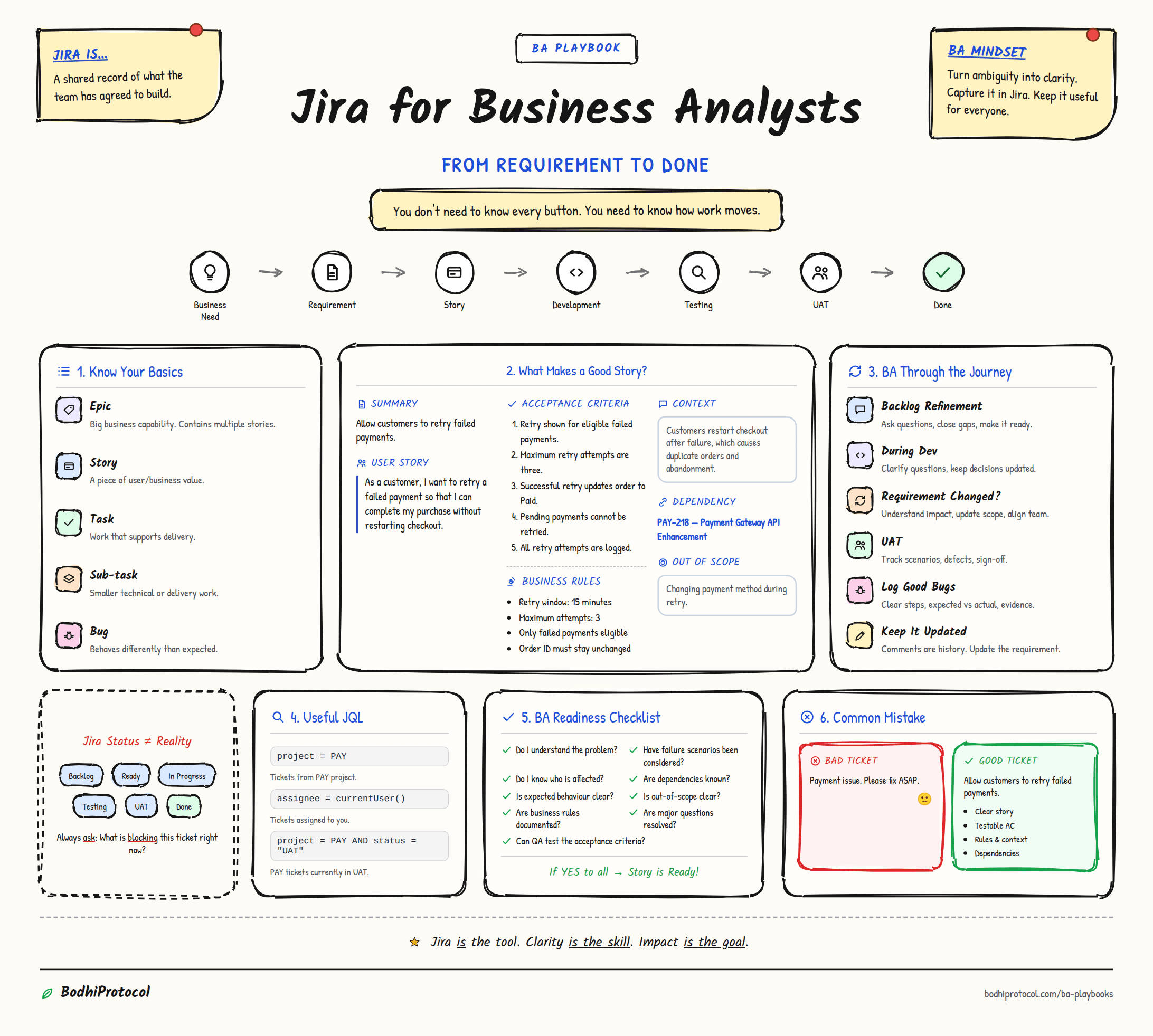
Jira gets painful when it becomes a place where information is dumped instead of structured. These are not admin tricks or Jira certification tips. They are small working habits that help Business Analysts make requirements clearer, decisions easier to trace, and tickets easier for developers and QA to use.
01Hack 01
Stop writing recurring tickets from scratch
If the structure already works, reuse it.
Hack 01
Stop writing recurring tickets from scratch
If the structure already works, reuse it.
Why it helps
You preserve useful structure while reducing accidental omissions.
When to use
Recurring changes across products, markets, releases, or similar workflows.
Pro tip — Never blindly clone old assumptions, dates, owners, or dependencies.
02Hack 02
Put context before the user story
A developer should understand the problem before reading the solution.
Hack 02
Put context before the user story
A developer should understand the problem before reading the solution.
The flow
Why it helps
"As a user..." rarely explains enough about why a change exists.
CONTEXT:

BUSINESS PROBLEM:

USER STORY:
As a...
I want...
So that...

BUSINESS RULES:

ACCEPTANCE CRITERIA:

DATA REQUIREMENTS:

DEPENDENCIES:

OUT OF SCOPE:

OPEN QUESTIONS:
03Hack 03
Write acceptance criteria QA can actually test
If QA cannot clearly determine pass or fail, the acceptance criterion is probably too vague.
Hack 03
Write acceptance criteria QA can actually test
If QA cannot clearly determine pass or fail, the acceptance criterion is probably too vague.
The flow
The shift
Why it helps
Testable acceptance criteria reduce interpretation gaps between BA, developers, and QA.
04Hack 04
Link dependencies instead of describing them
Relationships should be modelled, not buried inside paragraphs.
Hack 04
Link dependencies instead of describing them
Relationships should be modelled, not buried inside paragraphs.
The flow
Why it helps
Linked issues are visible, searchable, and much easier to trace than narrative dependency notes.
When to use
Cross-team, API, infrastructure, data, or upstream/downstream dependencies.
05Hack 05
Separate business rules from acceptance criteria
Rules describe how the business works. Acceptance criteria describe how the system should behave.
Hack 05
Separate business rules from acceptance criteria
Rules describe how the business works. Acceptance criteria describe how the system should behave.
Compare
Business Rule
Orders above £1 million require supervisory approval.
Acceptance Criterion
Given an order value above £1 million, when the trader submits the order, then the order enters Pending Approval status.
Why it helps
Mixing them makes requirements harder to maintain and test.
06Hack 06
Use labels like a taxonomy, not hashtags
Labels become useful only when the team agrees what they mean.
Hack 06
Use labels like a taxonomy, not hashtags
Labels become useful only when the team agrees what they mean.
The shift
Why it helps
Consistent labels improve filtering, dashboards, reporting, and historical analysis.
Pro tip — If everybody invents their own labels, labels eventually become useless.
07Hack 07
Create filters you will actually reuse
A good Jira filter turns searching into one click.
Hack 07
Create filters you will actually reuse
A good Jira filter turns searching into one click.
Replace the bracketed placeholders with your own project key and field names before saving — exact JQL syntax depends on your project's custom fields.
Why it helps
A saved filter turns a recurring manual hunt into a permanent, shareable view.
Saved filters
project = "[YOUR PROJECT]" AND assignee = currentUser() AND status != Done ORDER BY priority DESCproject = "[YOUR PROJECT]" AND status = "Blocked" AND labels = "requirements" ORDER BY updated DESCproject = "[YOUR PROJECT]" AND issuetype = Story AND "Acceptance Criteria" is EMPTYproject = "[YOUR PROJECT]" AND fixVersion = "[CURRENT RELEASE]" ORDER BY status ASCproject = "[YOUR PROJECT]" AND updated >= -3d ORDER BY updated DESC08Hack 08
Build a BA dashboard, not another status dashboard
A BA dashboard should show where thinking or decisions are stuck.
Hack 08
Build a BA dashboard, not another status dashboard
A BA dashboard should show where thinking or decisions are stuck.
At a glance
- Requirements awaiting clarification
- Blocked stories
- Open dependencies
- Items awaiting a business decision
- UAT defects
- Stories changed during the current sprint
Why it helps
That's more useful to a BA than simply seeing how many tickets are "In Progress."
09Hack 09
Don't hide decisions inside comments
Comments record conversation. Requirements should record the resulting truth.
Hack 09
Don't hide decisions inside comments
Comments record conversation. Requirements should record the resulting truth.
The shift
Why it helps
Six months later, nobody wants to read 47 comments to reconstruct a decision.
Decision: [what changed]
Reason: [why]
Date: [date]
Decision owner: [who]
Related requirement: [ticket/requirement ID]
10Hack 10
Add a Definition of Ready check
A ticket being created does not mean a ticket is ready.
Hack 10
Add a Definition of Ready check
A ticket being created does not mean a ticket is ready.
Checklist
- Business problem understood
- Acceptance criteria written
- Business rules identified
- Dependencies linked
- Data requirements understood
- Designs available if required
- Open questions resolved
- Test approach understood
Why it helps
A lightweight readiness check prevents partially understood requirements from quietly entering development.
Definition of Ready:
[ ] Business problem understood
[ ] Acceptance criteria written
[ ] Business rules identified
[ ] Dependencies linked
[ ] Data requirements understood
[ ] Designs available if required
[ ] Open questions resolved
[ ] Test approach understood
11Hack 11
Use subtasks only for real pieces of work
Do not turn every action you take into a Jira subtask.
Hack 11
Use subtasks only for real pieces of work
Do not turn every action you take into a Jira subtask.
The shift
Why it helps
Subtasks are useful when they represent trackable delivery work, not a personal to-do list.
12Hack 12
Build one reusable BA story template
Every hack in this guide eventually comes back to one thing.
Hack 12
Build one reusable BA story template
Every hack in this guide eventually comes back to one thing.
Start every ticket with a structure that reminds you what to think about.
At a glance
- Context
- Business Problem
- User Story
- Business Rules
- Acceptance Criteria
- Data Requirements
- Dependencies
- Out of Scope
- Open Questions
- Decisions
Why it helps
A single master template means every new ticket starts from the same complete structure instead of a blank page.
You don't need more Jira.
You need clearer Jira.
Most Jira problems are not really Jira problems. They are information-design problems. Clear context, explicit decisions, visible dependencies, and testable acceptance criteria make the tool much easier to work with.
Take this with you
BA Jira Story Template
TITLE

CONTEXT
Explain what is happening and why this change exists.

BUSINESS PROBLEM
What problem are we solving?

USER STORY
As a...
I want...
So that...

BUSINESS RULES


ACCEPTANCE CRITERIA
AC1
Given...
When...
Then...

AC2
Given...
When...
Then...

DATA REQUIREMENTS
Inputs:
Outputs:
Source systems:
Key fields:

DEPENDENCIES
Linked issues:
Systems:
Teams:

OUT OF SCOPE


OPEN QUESTIONS


DECISIONS
Get new playbooks first.
Continue your BA journey
Acceptance Criteria PlaybookHow to write acceptance criteria people can actually build and test.