BA Playbook
Nobody Can Reproduce the Production Issue
A practical BA playbook for investigating intermittent production issues that nobody can reproduce on demand.
Surya · August 13, 2026 · 8 min read · 8 practices
For Business Analysts investigating intermittent or hard-to-reproduce production issues, QA and Development teams triaging a "works for us" incident, Support and Operations teams gathering evidence from affected users and Anyone who's heard "we can't reproduce it" and needs a next step.
“It works for us”
A user reports:
“Payments fail randomly.”
Development tries it. Works.
QA tries it. Works.
UAT? Works there too.
Then comes the sentence that can quietly kill an investigation:
“We can’t reproduce it.”
That does not mean the issue doesn’t exist.
It means:
We haven’t reproduced the conditions that create it yet.
That is where the investigation begins.
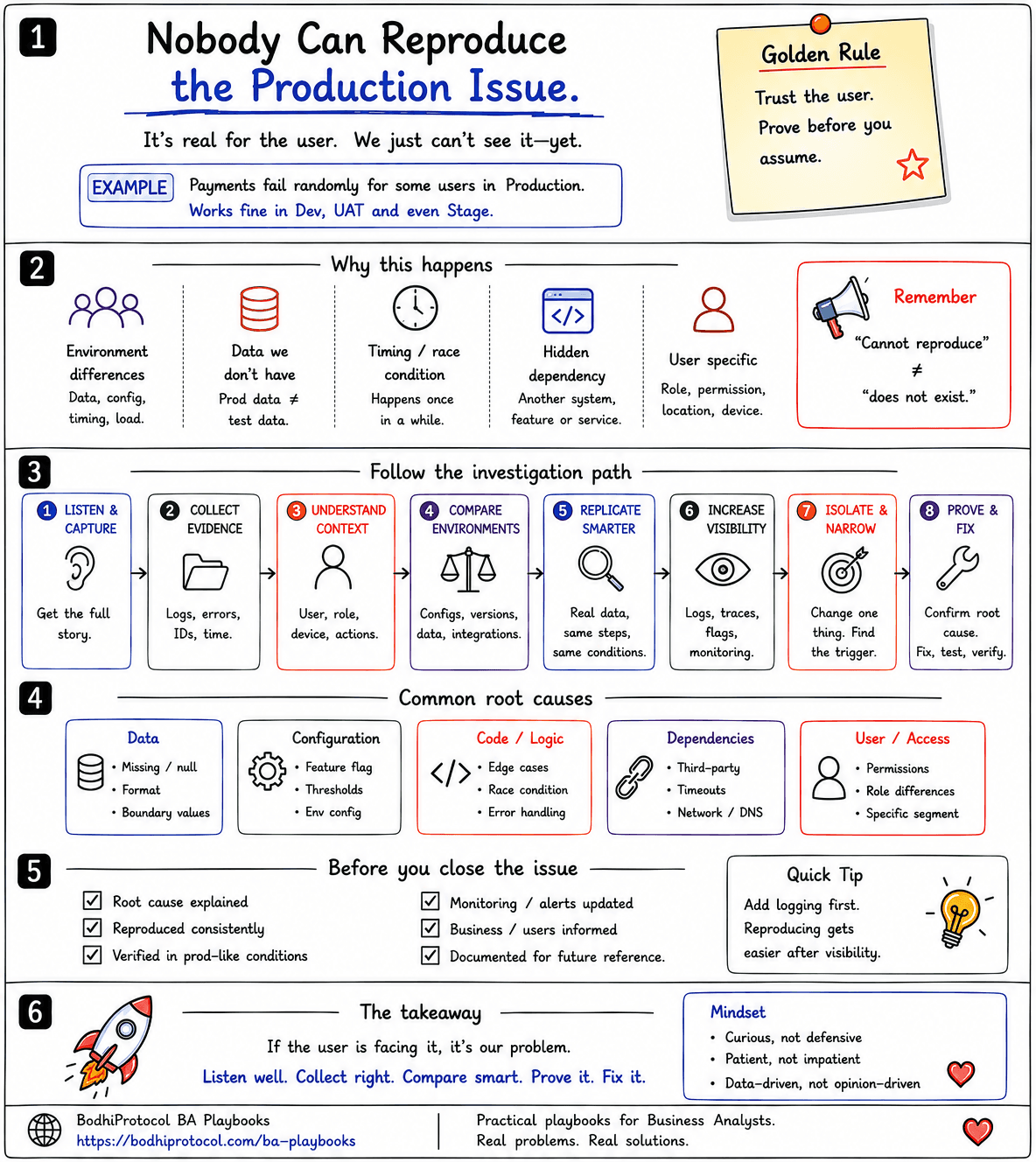
Here’s the situation
Imagine an e-commerce platform.
A few customers say payments sometimes fail after they click Pay Now.
No obvious pattern.
QA runs twenty successful payments in UAT.
Development tries locally. Success.
Production monitoring shows no major outage.
So what now?
The mistake is running the same test again and again.
The better question is:
What was different when the failure happened?
Let’s follow one failed payment and find out.
1. Listen & Capture — get the real story
Don’t begin with:
“Can you reproduce it again?”
Start with what actually happened. Ask:
- What were you trying to do?
- When did it happen?
- What did you expect?
- What happened instead?
- Has it happened before?
- Did retrying work?
Capture whatever evidence is available:
timestamp → user/reference ID → transaction/order ID → error → screenshot → sequence
Compare these two reports:
“Payment failed yesterday.”
versus:
“Order 78431 failed at 14:07 after OTP verification.”
The second one gives the team somewhere to start.
Our payment case — we capture: order 78431, time 14:07, device Android, payment international card, failure after OTP verification.
Already, “random” has become slightly less random.
2. Collect Evidence — before it disappears
Intermittent issues are easiest to investigate while the evidence still exists. Look for:
- application logs
- API responses
- correlation or trace IDs
- timestamps
- audit history
- monitoring
- request/response details where appropriate
Don’t collect sensitive production data casually. Use approved access, masking and security controls.
The goal isn’t more logs. The goal is to follow one failed journey.
Our payment case — the team traces order 78431. The payment request reached the application. It passed OTP verification. Then a downstream payment service rejected the request. Now we know where to look next.
3. Understand Context — what was different?
The same feature can behave differently depending on its surroundings. Check the conditions around the failure:
- User — role, permissions, customer type
- Device — browser, app version, operating system
- Location — region, network, timezone
- Data — account state, amount, currency, product
- Timing — peak period, scheduled jobs, batch windows
- Sequence — what happened immediately before the failure?
Maybe the issue affects only:
Android users on an older app version.
Or:
Customers with two addresses.
Or:
Transactions above a certain amount.
Or:
Requests arriving while a scheduled batch locks a record.
You are looking for a pattern hiding inside the word “random.”
Our payment case — the team compares successful and failed transactions. A clue appears: most failures involve international cards. That becomes the next hypothesis.
4. Compare Environments — don’t compare only code
A common assumption is:
“Same code, so it should behave the same.”
But production can differ from UAT in:
- data
- configuration
- feature flags
- permissions
- integrations
- service versions
- traffic
- network behaviour
- schedules
- infrastructure
So compare UAT vs Production, not only code vs code. Ask:
What exists in production that our test environment doesn’t reproduce?
Our payment case — UAT uses a test payment provider. Production routes certain international payments through another provider. Same application. Different path. Now the investigation is getting narrower.
5. Replicate Smarter — recreate conditions, not just steps
The user followed:
Login → Select product → Pay → Failure
Repeating those steps may not recreate the issue. Try to match the surrounding conditions:
- same data
- same user type
- same device/app version
- same configuration
- same integration path
- same sequence
- similar timing/load where safe
The goal isn’t to copy production recklessly. It is to recreate the smallest set of conditions that triggers the failure.
Our payment case — QA now tests: international card → same payment route → similar payload. The failure appears. For the first time, the team can reproduce it.
6. Increase Visibility — when the system isn’t telling you enough
Sometimes you can’t reproduce an issue because the system doesn’t expose enough evidence. That itself is useful information. The team may need:
- better structured logging
- correlation IDs
- metrics
- alerts
- audit events
- temporary diagnostics
- safer feature-level monitoring
A BA doesn’t need to design the observability platform. But a BA can ask:
“If this happens again, what evidence will we need to prove where it failed?”
That can become a requirement.
7. Isolate & Narrow — change one thing at a time
Once you have a hypothesis, narrow it. Suppose international payments look suspicious. Compare:
- Domestic vs international.
- One currency vs another.
- Mobile vs web.
- Existing customer vs new customer.
- Payment provider A vs provider B.
- One configuration vs another.
Don’t change five variables together. You are trying to turn:
“It fails sometimes.”
into:
“It fails when these conditions are true.”
Our payment case — the team eventually isolates this: international card + specific payment provider + address containing a special character. Now the failure is no longer random.
8. Prove & Fix — don’t stop at “probably”
The root cause is found. A downstream payment service rejects certain address characters because of an encoding issue. Now we have:
trigger → failure point → root cause
The team fixes it. But don’t stop there. Verify that:
- the original failing condition now succeeds
- related scenarios still work
- the fix behaves correctly under production-like conditions
- monitoring can detect recurrence where appropriate
“Developer says fixed” isn’t closure.
Evidence is closure.
Common places to investigate
When you don’t yet have a strong hypothesis, look across a few broad areas.
- Data — nulls, unexpected formats, boundary values, old or migrated records
- Configuration — feature flags, environment variables, thresholds, routing rules
- Code / Logic — edge cases, race conditions, error handling, state transitions
- Dependencies — third-party services, timeouts, network issues, version differences
- User / Access — permissions, roles, entitlements, customer segments
- Timing / Load — peak traffic, scheduled jobs, asynchronous processing, concurrency
Don’t blindly tick boxes. Use these areas to generate better hypotheses.
The BA mistake to avoid
A user says:
“It failed.”
The team says:
“We tested it and it works.”
Both statements can be true.
Don’t turn the investigation into a debate about who is right. Ask:
“What was different when it failed?”
Stay curious. Not defensive.
Before you close the issue
Readiness
- Can we explain the root cause?
- Can we reproduce the trigger, or prove it from evidence?
- Has the original failing condition been verified after the fix?
- Have related scenarios been checked?
- Is monitoring sufficient if it happens again?
- Have affected users or business teams been informed?
- Has the learning been documented?
Sometimes an intermittent problem cannot be made perfectly deterministic. That’s okay.
Closure should still be based on evidence—not exhaustion.
The Production Issue Investigation Playbook
- Listen & Capture → Get the exact story.
- Collect Evidence → Preserve the failed journey.
- Understand Context → Find the conditions around it.
- Compare Environments → Identify what differs.
- Replicate Smarter → Recreate conditions, not merely steps.
- Increase Visibility → Capture the evidence you’re missing.
- Isolate & Narrow → Find the trigger.
- Prove & Fix → Confirm, fix and verify.
Production Issue Investigation Checklist
Copy this into Jira, Confluence or your incident notes.
Listen & capture
- What the user was trying to do captured
- Timestamp, user/reference ID and transaction/order ID recorded
- Expected vs actual behaviour written down
- Screenshot or error captured
Collect evidence
- Application logs pulled
- API responses captured
- Correlation or trace IDs found
- One failed journey followed end to end
Understand context
- User role and permissions checked
- Device, browser and app version checked
- Location, network and timezone checked
- Data and account state checked
- Timing (peak period, batch, schedule) checked
- Sequence immediately before the failure reviewed
Compare environments
- UAT vs Production data compared
- Configuration and feature flags compared
- Integrations and service versions compared
- Traffic, infrastructure and scheduling compared
Replicate smarter
- Same data, user type and device recreated
- Same configuration and integration path recreated
- Same sequence and timing recreated
- Smallest failing condition reproduced
Isolate & narrow
- One variable changed at a time
- Trigger condition documented
- “Fails sometimes” turned into “fails when X is true”
Prove & fix
- Root cause explained
- Original failing condition verified after the fix
- Related scenarios checked
- Monitoring updated to detect recurrence
Close properly
- Affected users or business teams informed
- Learning documented
Take this into your next investigation
Production Issue Investigation Checklist
A one-page field guide for BAs, QAs, developers and support teams investigating intermittent or hard-to-reproduce production issues.
The takeaway
“Cannot reproduce” is not a root cause.
It is an investigation status.
If the user is facing it, the problem is real—even when your test passes.
Don’t keep repeating the same test and hoping the bug appears.
Capture the failed journey. Compare the conditions. Find what changed. Narrow the trigger. Then prove it.
A good investigation turns “random” into a pattern—and a pattern into a fix.
“Cannot reproduce” is not a root cause.
It is an investigation status.
If the user is facing it, the problem is real — even when your test passes. Capture the failed journey. Compare the conditions. Find what changed. Narrow the trigger. Then prove it. A good investigation turns “random” into a pattern—and a pattern into a fix.
Take this with you
Production Issue Investigation Checklist
PRODUCTION ISSUE INVESTIGATION CHECKLIST

LISTEN & CAPTURE
[ ] What the user was trying to do captured
[ ] Timestamp, user/reference ID and transaction/order ID recorded
[ ] Expected vs actual behaviour written down
[ ] Screenshot or error captured

COLLECT EVIDENCE
[ ] Application logs pulled
[ ] API responses captured
[ ] Correlation or trace IDs found
[ ] One failed journey followed end to end

UNDERSTAND CONTEXT
[ ] User role and permissions checked
[ ] Device, browser and app version checked
[ ] Location, network and timezone checked
[ ] Data and account state checked
[ ] Timing (peak period, batch, schedule) checked
[ ] Sequence immediately before the failure reviewed

COMPARE ENVIRONMENTS
[ ] UAT vs Production data compared
[ ] Configuration and feature flags compared
[ ] Integrations and service versions compared
[ ] Traffic, infrastructure and scheduling compared

REPLICATE SMARTER
[ ] Same data, user type and device recreated
[ ] Same configuration and integration path recreated
[ ] Same sequence and timing recreated
[ ] Smallest failing condition reproduced

ISOLATE & NARROW
[ ] One variable changed at a time
[ ] Trigger condition documented
[ ] "Fails sometimes" turned into "fails when X is true"

PROVE & FIX
[ ] Root cause explained
[ ] Original failing condition verified after the fix
[ ] Related scenarios checked
[ ] Monitoring updated to detect recurrence

CLOSE PROPERLY
[ ] Affected users or business teams informed
[ ] Learning documented
Get new playbooks first.