BA Playbook
It Worked in UAT. Why Did It Fail in Production?
A practical BA playbook for tracing why tested behaviour changes after release—and finding the first real difference.
Surya · August 13, 2026 · 7 min read · 7 practices
For Business Analysts investigating a feature that passed UAT but failed in production, QA and Development teams triaging a post-release incident, Delivery leads and Product Owners handling release defects and Anyone who's heard "but we tested it" on an incident call.
“But we tested it” is the start of the investigation, not the end
Monday morning.
A message appears in the project group:
“Customers cannot cancel some orders. This worked in UAT. What changed?”
QA says:
“We tested cancellation. It passed.”
Development says:
“The same code went to production.”
Operations says:
“Real customers are still affected.”
Everyone may be telling the truth.
That is what makes this kind of incident confusing.
The feature can pass UAT and still fail in production—not because UAT was useless, but because production is rarely just UAT with more users.
It has different data, integrations, permissions, configuration, timing and volume.
Same code does not mean the same system.
Let’s investigate one incident together.
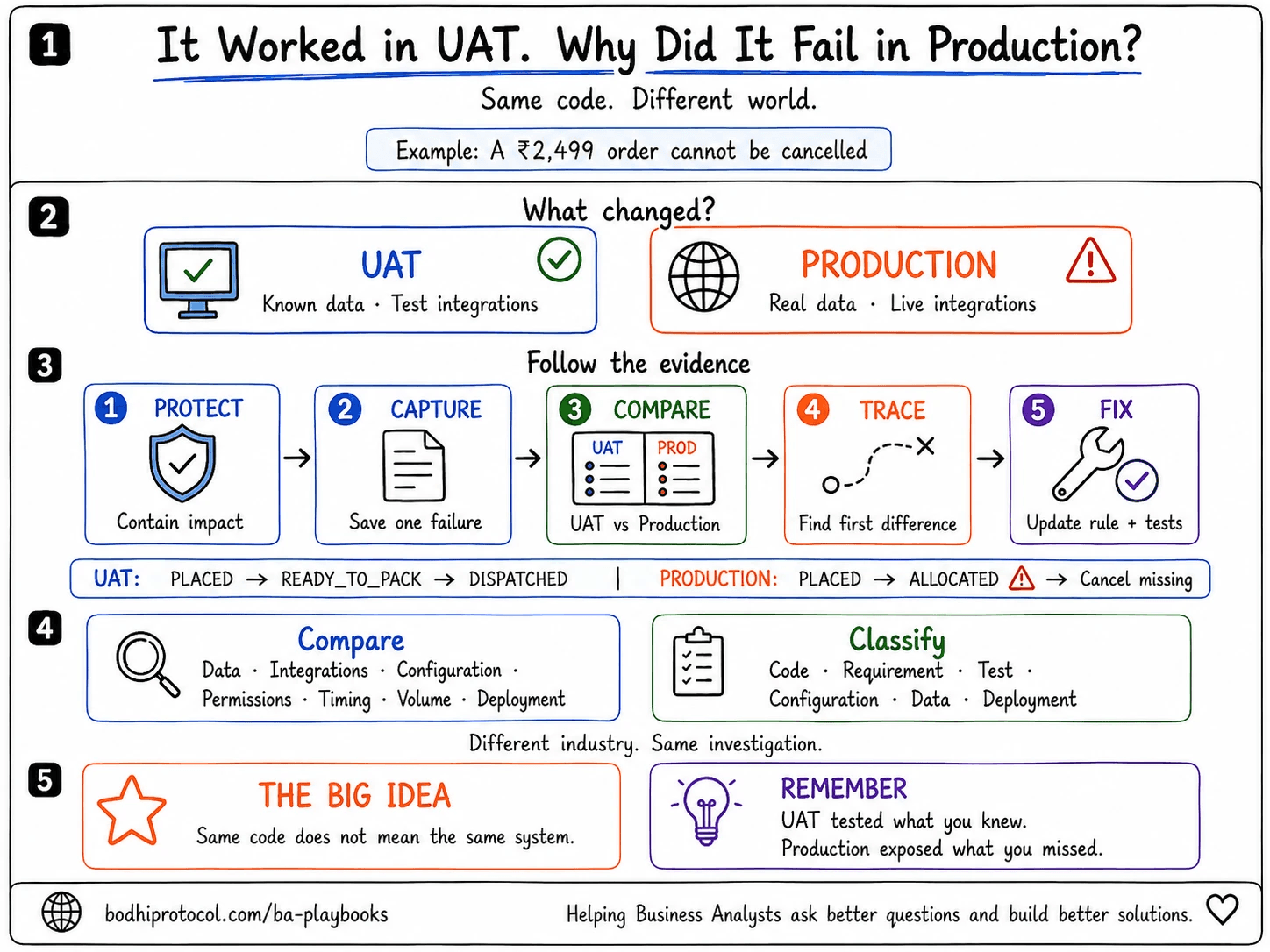
Here’s the requirement
An Indian e-commerce company introduces self-service order cancellation.
The requirement says:
A customer can cancel an order until it has been dispatched.
The team builds the feature.
In UAT, QA tests orders with these statuses:
- PLACED → cancellation allowed
- READY_TO_PACK → cancellation allowed
- DISPATCHED → cancellation blocked
Everything passes.
The feature goes live.
Then a customer tries to cancel a ₹2,499 shoe order. The order has not been dispatched, but the Cancel order button is missing.
So what happened?
First, understand what UAT actually proved
UAT proved that the feature behaved as expected:
- with the data used in UAT
- against the UAT integrations
- under UAT configuration
- with the tested user roles
- for the scenarios the team knew to test
That matters.
But it did not prove that production would send the same data through the same path under the same conditions.
UAT tests expected behaviour in a controlled world. Production introduces the world you did not fully control.
That does not automatically make this a testing failure.
It means the investigation should begin with differences, not blame.
Before the investigation: protect the customer
If the failure is causing financial loss, exposing data, blocking critical work or affecting many users, containment comes first.
The team may need to disable the feature, pause processing, roll back the release or provide a temporary workaround.
The BA can help establish:
- who is affected
- which products, regions and channels are involved
- whether money, data, compliance or customer commitments are at risk
- what behaviour is safe until the cause is understood
Preserve evidence, but do not keep a harmful feature running just to make the investigation easier.
Step 1: Preserve the failing example
Before anyone refreshes data, retries the transaction or changes configuration, capture one real failure.
For our order, record:
- order ID
- customer and account type
- date and exact time
- channel: web, Android, iOS or API
- status shown to the customer
- status received from the warehouse system
- expected behaviour
- actual behaviour
- screenshot or error message
- release and configuration version
Do not start with:
“Cancellation is broken.”
Start with:
“For order IN-48217, at 10:42 IST, the customer could not cancel through the Android app even though the order had not been dispatched.”
Now the team has something it can trace.
Without a specific example, every team investigates a slightly different problem.
Step 2: Follow the transaction—not the opinions
The customer sees no cancellation button.
That does not mean the screen is the problem.
The button may depend on a decision made several systems earlier.
For order IN-48217, the team traces the path:
- The app requests the latest order details.
- The order service retrieves the fulfilment status.
- The warehouse system returns ALLOCATED.
- The cancellation rule checks whether that status is cancellable.
- ALLOCATED is not in the permitted-status list.
- The service returns
canCancel: false. - The app hides the button.
The screen behaved correctly based on the answer it received.
The first meaningful difference appeared earlier: the production warehouse returned a status nobody had used in UAT.
Do not ask only where the failure became visible. Ask where the behaviour first became different.
Step 3: Compare UAT and production side by side
“The environments are the same” is not evidence.
Build a small comparison table.
| Area | UAT | Production | Difference? |
|---|---|---|---|
| Order status | READY_TO_PACK | ALLOCATED | Yes |
| Warehouse integration | Test stub | Live warehouse platform | Yes |
| Cancellation rule | Known statuses allowed | Same configured list | No |
| Customer role | Test customer | Retail customer | No |
| Channel | Web and Android | Android | No |
| Feature flag | Enabled | Enabled | No |
| Release version | 5.8.0 | 5.8.0 | No |
This changes the conversation.
The team is no longer debating whether “the same code” was deployed.
It is looking at the conditions around that code—because the code is only one part of the behaviour.
Step 4: Check the seven places production commonly differs
You do not need to inspect everything randomly. Work through seven areas.
1. Data
Look for values that never appeared in UAT, missing fields, historical records, duplicates and unexpected formats. In our example, ALLOCATED existed in production but not in the UAT test set.
2. Integrations
UAT may use a stub, simulator or simplified downstream system. Compare API versions, fields, mappings, authentication, timeouts and retries. Here, the stub returned three clean statuses; the live warehouse returned more.
3. Configuration and feature flags
The code can be identical while settings change its behaviour. Compare business-rule values, thresholds, country or product settings, feature flags and routing rules.
4. User roles and permissions
A feature tested with an administrator account may behave differently for a real customer, operations user or branch employee.
Check both what the user can see and what the service account can access.
5. Timing
Some failures exist only at a particular moment: a batch run, stale cache, cut-off time, time-zone conversion, event-order problem or concurrent update.
An Indian payment processed at 11:58 PM IST and an international payment processed near a daylight-saving change can expose timing assumptions that ordinary daytime UAT never touched.
6. Volume and concurrency
One clean test transaction is not the same as thousands of customers acting together.
Production may introduce queues, locking, delayed messages, duplicate events or timeouts.
7. Deployment
Confirm the application version, database scripts, configuration, reference data, scheduled jobs and dependent releases that actually reached production.
“It was included in the release” and “it is active in production” are not always the same statement.
Step 5: Return to the requirement
Now reread the original sentence:
A customer can cancel an order until it has been dispatched.
It sounds clear.
But the system did not implement the word dispatched. It implemented a list of statuses believed to mean “not dispatched.”
That list did not include ALLOCATED.
This is the hidden gap:
| Business rule | System interpretation |
|---|---|
| Allow cancellation before dispatch | Allow cancellation only for PLACED and READY_TO_PACK |
Those statements looked equivalent in UAT.
Production revealed that they were not.
The missing question was:
“What are all the statuses an order can have before dispatch—including statuses returned only by the live warehouse?”
Sometimes production does not invalidate the requirement.
It reveals an assumption hiding inside it.
Step 6: Classify the issue correctly
Not every production mismatch is simply “a bug.”
Classify it so the right action follows.
| Classification | What it means | Example |
|---|---|---|
| Code defect | The system violates an agreed rule | DISPATCHED orders can still be cancelled |
| Requirement gap | A scenario or rule was never defined | ALLOCATED was not mapped to cancellable or non-cancellable |
| Test coverage gap | The rule existed but the scenario was not tested | ALLOCATED was documented but absent from UAT |
| Configuration issue | The correct rule is configured differently | Production feature flag is disabled |
| Data issue | Unexpected or incorrect data drives the behaviour | Warehouse sends an invalid status |
| Deployment issue | Part of the release is missing or inactive | Reference-data update was not deployed |
For our incident, the immediate failure is a missing status mapping.
But the deeper issue is shared:
- the requirement did not enumerate fulfilment states
- the UAT stub did not represent the live status set
- the test pack did not include ALLOCATED
Calling it only a “UI bug” would fix the symptom and preserve the conditions that created it.
One incident can have several contributing causes. Classification is meant to improve the fix, not assign the blame neatly to one team.
Step 7: Fix the rule, the test and the environment
The team decides that ALLOCATED still means “not dispatched.”
So it:
- adds ALLOCATED to the cancellable mapping
- confirms the decision with fulfilment and customer-service owners
- updates the business-rule documentation
- adds the status to the UAT test data
- replaces the simplified stub response set with the complete production status list
- adds monitoring for unknown fulfilment statuses
- retests cancellation across web, Android, iOS and API channels
Now the fix does more than restore one missing button.
It makes the same class of failure easier to prevent and detect.
The same pattern appears in every industry
The nouns change. The investigation does not.
- Banking: UAT tests ACTIVE and BLOCKED accounts. Production sends PENDING_REVIEW.
- Insurance: UAT contains one policy per customer. Production contains migrated customers with overlapping policies.
- Healthcare: UAT uses current provider IDs. Production still contains claims referencing retired IDs.
- International e-commerce: UAT tests one currency and warehouse. Production adds currencies, tax rules, fulfilment partners and time zones.
- Capital markets: UAT tests clean trades in market hours. Production introduces late events, amendments, multiple venues and asynchronous confirmations.
In each case, the useful question is not:
“Who missed this?”
It is:
“Which production condition did our UAT model fail to represent?”
What should the BA actually do?
The BA does not need to read every log or diagnose the code alone.
The BA’s job is to keep the investigation connected to business behaviour.
That means:
- turning “it is broken” into one traceable example
- stating expected and actual behaviour clearly
- comparing UAT and production conditions
- identifying the first point of divergence
- bringing the correct business and technical owners together
- exposing missing rules and assumptions
- recording the decision
- making sure the requirement and regression tests are updated
Development may locate the technical failure.
QA may reproduce it.
Operations may provide the production evidence.
The BA helps the team agree on what the system should have done—and ensures the answer survives beyond the incident call.
Eight questions to ask during the incident
- What exact transaction failed?
- What did the user expect, and what happened instead?
- Is the issue limited to certain users, products, regions or channels?
- Was this exact scenario tested in UAT?
- Did UAT use the same values, mappings and integrations?
- Where did the transaction first behave differently?
- Is this a defect, a missing rule or a new scenario?
- What else depends on the same rule or data value?
UAT-to-Production Investigation Checklist
Copy this into Jira, Confluence or your incident notes.
Impact and containment
- Affected users, products, regions and channels identified
- Financial, data, regulatory and operational risk assessed
- Safe workaround, rollback or feature control considered
Failing example
- Transaction or record ID captured
- User, role, channel and region recorded
- Exact date and time recorded
- Expected behaviour written clearly
- Actual behaviour written clearly
- Screenshot, response or error captured
Compare environments
- Application version
- Configuration and feature flags
- Reference data and mappings
- User and service permissions
- API and integration versions
- Test stub versus live integration
- Batch jobs, cache and timing
- Data shape, history and volume
Trace the flow
- End-to-end transaction path mapped
- First point of divergence identified
- Upstream and downstream impact checked
- Related transactions searched
Classify
- Code defect
- Requirement gap
- Test coverage gap
- Configuration issue
- Data issue
- Deployment issue
Close properly
- Business decision recorded
- Requirement or rule updated
- UAT data and regression tests updated
- Production-like scenario added
- Monitoring or alerting considered
- Related features checked for the same assumption
Take this into your next incident
UAT-to-Production Investigation Canvas
Capture one failure, compare UAT with production, trace the first point of divergence and record the fix—on one printable page.
Before the next release
You cannot make UAT identical to production.
You can make it more representative.
That does not mean copying sensitive customer, patient or financial data into UAT. Use masked or synthetic data that preserves the important statuses, formats, relationships and edge cases.
Before release, ask:
- Which production values do not exist in UAT?
- Which integrations or settings differ?
- Which roles, channels, regions and edge cases remain untested?
- How will the system flag an unknown value instead of silently mishandling it?
That final question is especially useful.
If the cancellation service had flagged ALLOCATED as an unknown status, the team could have found the gap before a customer found it.
The takeaway
When something works in UAT and fails in production, resist the quickest explanations:
“QA missed it.”
“Development deployed the wrong code.”
“Production data is bad.”
Any of those may eventually be true.
But begin with evidence.
Preserve one failure. Trace the transaction. Compare the environments. Find the first difference. Return to the business rule.
Because UAT and production usually disagree for a reason.
Find the first place where their stories stopped being the same.
UAT did not lie. It answered the question you asked. Production exposed the question you forgot to ask.
UAT did not lie.
It answered the question you asked.
Production exposed the question you forgot to ask. Preserve one failure. Trace the transaction. Compare the environments. Find the first difference. Return to the business rule.
Take this with you
UAT-to-Production Investigation Checklist
UAT-TO-PRODUCTION INVESTIGATION

IMPACT AND CONTAINMENT
[ ] Affected users, products, regions and channels identified
[ ] Financial, data, regulatory and operational risk assessed
[ ] Safe workaround, rollback or feature control considered

FAILING EXAMPLE
[ ] Transaction or record ID captured
[ ] User, role, channel and region recorded
[ ] Exact date and time recorded
[ ] Expected behaviour written clearly
[ ] Actual behaviour written clearly
[ ] Screenshot, response or error captured

COMPARE ENVIRONMENTS
[ ] Application version
[ ] Configuration and feature flags
[ ] Reference data and mappings
[ ] User and service permissions
[ ] API and integration versions
[ ] Test stub versus live integration
[ ] Batch jobs, cache and timing
[ ] Data shape, history and volume

TRACE THE FLOW
[ ] End-to-end transaction path mapped
[ ] First point of divergence identified
[ ] Upstream and downstream impact checked
[ ] Related transactions searched

CLASSIFY
[ ] Code defect
[ ] Requirement gap
[ ] Test coverage gap
[ ] Configuration issue
[ ] Data issue
[ ] Deployment issue

CLOSE PROPERLY
[ ] Business decision recorded
[ ] Requirement or rule updated
[ ] UAT data and regression tests updated
[ ] Production-like scenario added
[ ] Monitoring or alerting considered
[ ] Related features checked for the same assumption
Get new playbooks first.