BA Playbook
What Exactly Should a BA Check Before UAT Starts?
UAT scheduled isn't UAT ready. A BA field guide to the eight things worth verifying before anyone says "Start UAT."
Surya · August 14, 2026 · 8 min read · 8 practices
For Business Analysts about to sign off that UAT can start, QA leads and delivery managers running a pre-UAT readiness review, Freshers and aspiring BAs learning what "ready" actually means beyond the test plan and Anyone who's watched a UAT morning turn into troubleshooting instead of testing.
UAT scheduled is not the same thing as UAT ready
The calendar says UAT starts tomorrow.
Test cases are written.
Business users have blocked their calendars.
Everyone says:
“We’re ready.”
Monday morning arrives.
The first tester logs in. Their account doesn’t work.
Another tester discovers the test customer doesn’t exist.
The API points to the wrong service.
A feature flag is still off.
By lunchtime, nobody is testing the requirement.
They’re testing whether the test setup works.
That’s the difference between:
UAT scheduled
and
UAT ready.
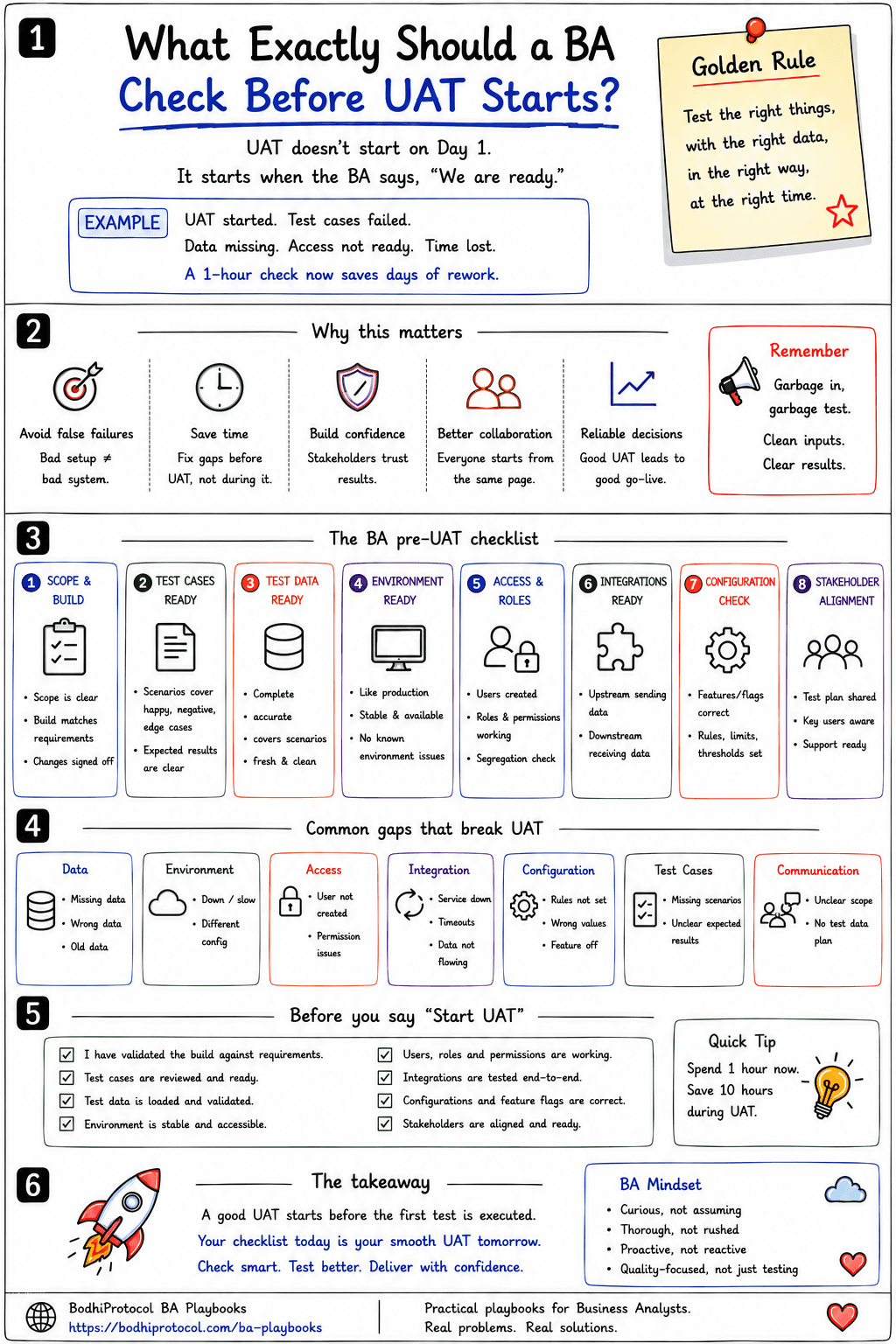
First: what is UAT actually proving?
User Acceptance Testing isn’t another round of developer testing.
It answers a business question:
“Does this solution support the real business need well enough for us to accept it?”
That needs more than a working build.
You need the right scope, scenarios, data, environment, users, integrations and configuration.
If one is wrong, UAT can tell you the wrong story.
Here’s the situation
Imagine a bank is introducing a new beneficiary-verification flow.
The requirement says:
Transfers above ₹2 lakh to a new beneficiary require additional verification.
Development is complete. System testing passed. UAT begins tomorrow.
Before saying “go,” what should the BA check?
1. Scope & Build — are we testing the right thing?
Start with the requirement. Ask:
- What exactly is in UAT scope, and what is explicitly out?
- Which stories or requirements are included?
- Are late changes reflected, and does the deployed build actually contain them?
- Are known limitations documented?
Imagine QA tested version 4.8, but UAT accidentally receives 4.7. Every failure after that creates noise.
Before UAT: confirm the requirement scope and deployed build match.
2. Test Cases — are we testing the business, not just the happy path?
Good UAT scenarios represent how people actually use the system.
For our transfer example, don’t test only:
New beneficiary + ₹3 lakh → verification appears.
Also test:
- Boundary: exactly ₹2 lakh.
- Below threshold: ₹1,99,999.
- Existing beneficiary: should verification apply?
- Failure: verification service unavailable.
- Retry: user fails verification and tries again.
- Permissions: can the right user perform the action?
- End-to-end: does the transfer continue correctly afterwards?
A useful BA question:
“What would make the business refuse to accept this feature?”
Turn those risks into scenarios.
3. Test Data — can those scenarios actually be executed?
This is one of the biggest UAT killers. The scenario exists. The data doesn’t.
Map important scenarios to the data they require:
- New beneficiary → customer with no prior beneficiary
- Above threshold → account with sufficient balance
- Existing beneficiary → customer with a saved beneficiary
- Failed verification → test identity that triggers failure
- Permission check → user with a restricted role
And verify the data actually works. Not:
“Someone said it was loaded.”
Actually validate it. Use approved masked or synthetic data where required.
4. Environment — is it stable enough to trust the result?
A bad environment can make a good feature look broken.
For the beneficiary-verification flow, that means confirming the UAT build actually matches the release QA signed off — not a build two commits behind it. It means checking that the verification service’s UAT endpoint calls the real rules engine, not a stub that always returns “verified” regardless of amount. And it means confirming last night’s data refresh didn’t quietly wipe out the customer accounts the test cases depend on.
More generally, check:
- Correct build deployed, environment accessible, database available
- Required services running, no known blocking outage
- Test data refreshed correctly, URLs and endpoints correct
- No uncoordinated changes during critical testing
The environment doesn’t need to be perfect. It needs to be stable enough that:
failure means something — not that the ₹2 lakh transfer failed because the environment reset overnight.
5. Access & Roles — can the testers actually test?
The testers for this flow are branch relationship managers and operations staff — not developers. Never assume:
“They had access last time.”
Before Day 1, check whether their UAT accounts can actually originate a transfer above ₹2 lakh — not just view one — whether the maker-checker workflow is configured for that amount, and whether their role includes the specific permission tied to this new step. More generally:
- Are users created, and can they log in?
- Are roles and permissions correct?
- Can they access dependent systems?
- Is MFA/VPN working, and are segregation-of-duties rules respected?
Eight relationship managers discovering their login can’t originate a transfer during the UAT call is not testing.
It’s troubleshooting.
6. Integrations — can the whole journey complete?
Your feature may work perfectly. But UAT usually tests a journey.
For the beneficiary-verification flow, that journey looks like:
Transfer Initiation → Verification API → Core Banking Ledger → Fraud/Risk Screening → SMS/Notification Gateway
If the SMS gateway in UAT is a mock that never actually fires, a tester can “pass” a scenario that would leave a real customer staring at a screen waiting for an OTP that never arrives.
Ask:
“What other system must work for this scenario to finish?”
Check critical upstream and downstream dependencies before testers arrive.
7. Configuration — does UAT reflect the intended business setup?
Configuration can quietly invalidate otherwise perfect testing.
Suppose the requirement says verification above ₹2 lakh, but UAT is configured for ₹5 lakh. The code may be perfect. The test will still tell the wrong story. The same goes for a feature flag that’s still off, an OTP retry limit set differently than production, or an NRI-account threshold that was never updated to match the new rule.
More generally, check:
- Feature flags, thresholds, business rules
- Product configuration, reference data, routing
- Currencies/countries, dates/calendars, user entitlements
8. Stakeholders — does everyone know how UAT will work?
Technology can be ready while UAT still fails operationally.
For this flow specifically, the branch operations lead, the fraud and risk owner, the release manager and the BA all need to agree, before Day 1, on what a passing scenario looks like, who raises a defect if a real ₹2 lakh transfer wrongly skips verification, and who has the authority to call a No-Go if the verification service turns out not to be reliable enough to trust. More generally, everyone should know:
- What are we testing, and who is testing what?
- Where are results recorded, and how are defects raised?
- Who triages them, and what counts as a blocker?
- Who decides acceptance?
Also identify the support path: engineering, QA, BA, environment support, data support and integration teams.
You don’t need everyone in every meeting.
You need to know who to call when something breaks.
Don’t ask if it’s ready. Ask what proves it.
This is where the BA can make a big difference.
Instead of:
“Is the environment ready?”
look for evidence:
- Login tested.
- Build verified.
- Endpoint checked.
- Test data validated.
- Critical scenario executed.
“Someone confirmed it” is assurance. “Someone demonstrated it” is evidence.
A useful BA habit:
Don’t ask whether something is ready. Ask what proves it is ready.
Define the exit before you enter
One question teams often leave until too late:
“What does successful UAT look like?”
Agree that before testing starts. Exit criteria might include:
- Critical business scenarios executed
- No open Severity 1 defects
- Agreed treatment for remaining defects
- Required business sign-off obtained
- Evidence stored, known limitations accepted
Exact rules vary by organisation. But if nobody knows what “UAT complete” means, sign-off becomes an argument at the end.
What should the BA personally own?
The BA should not become:
environment engineer + test-data engineer + access administrator + QA lead + release manager
That isn’t the job. The BA’s role is to make readiness visible.
You may not provision the environment. But you should know whether it’s ready.
You may not create user accounts. But you should know whether testers can log in.
You may not configure the API. But you should know whether the business journey can execute.
Think:
coordinate, verify, expose gaps.
Not:
personally do everything.
Run a UAT readiness check
Before UAT, bring the key people together for a short readiness review. Walk through Scope & Build, Scenarios, Data, Environment, Access, Integrations, Configuration, Business users, Support path and Exit criteria.
Don’t turn this into a two-hour status meeting.
You’re trying to answer one question:
“What could prevent meaningful testing tomorrow?”
Find it today.
Go / Conditional Go / No-Go
Readiness doesn’t always have to be binary.
GO
Critical prerequisites are ready. Start UAT.
CONDITIONAL GO
A known gap exists, but meaningful testing can continue safely around it. Document the limitation and continue.
NO-GO
A prerequisite prevents meaningful testing — wrong build, unusable test data, a critical integration unavailable, testers who can’t access the system.
Postponing UAT by a day can be cheaper than wasting ten people’s day pretending to test.
Before you say “Start UAT”
Scope, scenarios & data
- Scope is clear and correct build is deployed
- Critical business scenarios are covered
- Expected results are clear
- Test data is available and validated
Environment & access
- Environment is accessible and stable
- Test users can log in
- Roles and permissions are correct
- Critical integrations work
Configuration
- Configuration and feature flags are correct
People & process
- Business testers know their responsibilities
- Defect and triage process is understood
- UAT exit criteria are agreed
- Support contacts are known
If several answers are:
“We think so.”
you’re probably not ready.
Take this into your next readiness review
Pre-UAT Readiness Checklist
Scope and build, scenarios, data, environment, access, integrations, configuration and stakeholders — on one printable page, ending in a GO / Conditional Go / No-Go call.
The takeaway
Good UAT doesn’t begin because the calendar says:
Day 1
It begins when business users can execute meaningful scenarios and trust what the results are telling them.
So before asking:
“Are the business users ready to test?”
ask:
“Have we made it possible for them to test properly?”
That’s the BA’s job here.
Not to personally fix every environment, account, API or dataset.
To make readiness visible before those gaps waste everyone’s time.
UAT isn’t ready because the test plan exists. It’s ready when the business can test the right thing, with the right data, in the right conditions — and the team has evidence to prove it.
Don't ask if it's ready.
Ask what proves it is ready.
UAT isn't ready because the test plan exists. It's ready when the business can test the right thing, with the right data, in the right conditions — and the team has evidence to prove it.
Take this with you
Pre-UAT Readiness Checklist
BEFORE YOU SAY "START UAT"

[ ] Scope and build verified.
[ ] Cases and expected results ready.
[ ] Test data validated.
[ ] Environment stable.
[ ] Users and access working.
[ ] Integrations available.
[ ] Configuration correct.
[ ] Business testers aligned.
[ ] Defect/triage process clear.
[ ] Exit criteria agreed.
[ ] Support contacts known.

THE ONE QUESTION
What could prevent meaningful testing tomorrow? Find it today.

GOLDEN RULE
Test the right thing, with the right data, in the right conditions.
Get new playbooks first.